

Office Desktop PCs Sydney – Fast, Reliable & Built for Work
At CAA Computers, we build and supply powerful, dependable office desktop PCs designed for productivity, accounting, admin work, business operations, and home offices.
Proudly based in Kingsgrove, we serve Bankstown, Revesby, Padstow, Menai, Moorebank, Hurstville, Penshurst and all of Sydney’s south-west.
Whether you need an affordable office PC, a professional workstation, or a business desktop for MYOB & Xero, our computers deliver speed, stability, and long-term reliability.
Business Desktop PCs – Reliable Power for Daily Work
Our office PCs are engineered to handle everything a modern workplace needs:
MYOB, Xero, QuickBooks
Microsoft Office (Word, Excel, Outlook, PowerPoint)
Internet browsing & cloud apps
Emails, CRM systems, accounting platforms
Admin, reception, and productivity tasks
Work-from-home environments
Multiple monitor workflows
Remote meetings (Zoom, Teams, Google Meet)
Every system is built with fast SSD storage, quiet cooling, and business-grade components to ensure smooth performance all day.
Featured Office & Business PCS

Budget Office PC — $799 (Save $320)
Perfect for: Accounting, admin, Uni students, reception desks, everyday office work.
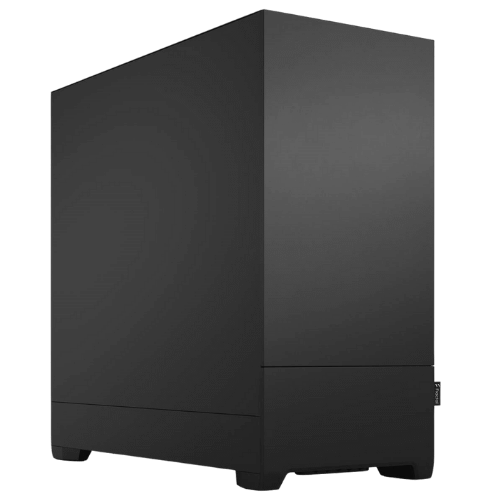
Creator Pro Workstation – CAD, Joinery, 3D Design – $1,899 (Save $500)
Ideal for:
Kitchen joinery, CAD drafting, ArchiCAD, SketchUp, Revit, 3D modelling, manufacturing software.
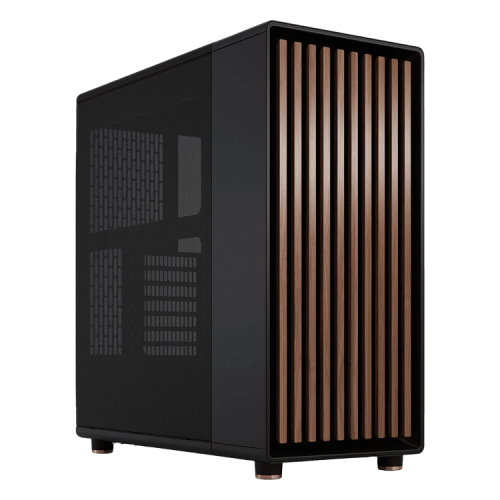
Mid-Tier Media Production Workstation
Built for:
Adobe Premiere Pro, After Effects, Photoshop, DaVinci Resolve, AI workflows, content creators.
Office Computers for Accounting, Admin & Small Business
Our office desktops are tuned specifically for business software:
MYOB
Xero
QuickBooks
Office 365
Google Workspace
Zoho
CRM platforms
Cloud invoicing & POS systems
With fast SSDs and high-efficiency processors, even budget machines run day-to-day tasks effortlessly.

Desktop PCs for Work From Home & Hybrid Work
Need a quiet, reliable home office PC?
We build systems perfect for:
Remote work
Online meetings
Multi-monitor setups
Web-based apps
Microsoft Teams & Zoom
Cloud storage & remote access
Quiet cooling and fast load times mean your system stays responsive all day.

Why Choose CAA Computers for Office PCs in Sydney?
Here’s what makes us better than prebuilt brands:
Fast, Reliable Performance
Business-grade CPUs and SSDs for smooth multitasking and zero slowdown.
12-Month Warranty & Local Support
No overseas call centres — speak directly to Sydney technicians.
Easy Upgrades & Repairs
Affordable component upgrades and quick turnaround service.
Tailored to Your Software
Optimised for MYOB, Xero, Office, Adobe, CAD and cloud-based apps.
Built & Tested Locally
Hand-built in Kingsgrove and stress-tested for stability and long life.
Office Desktop PCs for Bankstown, Kingsgrove & Sydney South-West
We supply, build, and ship office PCs throughout:
Bankstown
Kingsgrove
Revesby
Padstow
Menai
Moorebank
Penshurst
Hurstville
Local pickup available at 328 Kingsgrove Rd, Kingsgrove NSW 2208.
Frequently Asked Questions (Office PCs)
1. What’s the best office PC for accounting software?
We recommend our Budget Office PC or a mid-tier Intel i5/i7 build for MYOB, Xero and Office.
2. Do office PCs come with Windows 11?
Yes — all systems include Windows 11 pre-installed.
3. Do you build custom office computers for teams?
Absolutely — we customise builds for offices of any size.
4. Do you ship Australia-wide?
Yes, we deliver office PCs across Australia.
5. Do your office PCs support multiple monitors?
Yes — all work PCs support dual or triple monitors.
Contact Us for a Custom Office PC Quote
Need a computer tailored to your accounting software, staff workloads, or creative needs?
We’ll design a system around:
Your budget
Number of staff
Required software
Performance needs
Storage requirements
Multi-monitor productivity
Call: 0459 681 726
Email: Brett@caacomputers.com.au
Visit: 328 Kingsgrove Rd, Kingsgrove 2208 NSW
Send us an email
Brett@caacomputers.com.au
Give us a call
0459 681 726
Build Your Business Workstation
Read More
1. What Makes an Office Desktop PC Different From a Home Computer?
Office PCs are engineered for long hours of operation, multitasking, stability, and compatibility with business software such as Microsoft Office, MYOB, Xero, CRM platforms, cloud apps, and browser-based tools.
They use efficient processors, enterprise-grade storage, low-noise cooling, and are built for reliable daily use.
Businesses prefer office desktops because they last longer, run cooler, and offer better security options than typical home PCs.
2. What Office PC Specs Do I Need for My Business?
The right system depends on what your team does:
Admin, reception, payroll: i3 / Ryzen 3, 8–16GB RAM, 500GB SSD
Accounting, MYOB, Xero, spreadsheets: i5 / Ryzen 5, 16GB RAM, 500GB–1TB SSD
Graphic design, Photoshop, Canva: i7 / Ryzen 7, 32GB RAM, dedicated GPU
CAD, drafting, kitchen–joinery: i7 / Ryzen 7, 32–64GB RAM, workstation GPU
Remote work & Teams/Zoom calls: Any modern CPU + SSD + 16GB RAM
Small business servers / virtual machines: Ryzen 9, Intel i9, ECC RAM
This helps Google understand your software-targeted relevance.
3. Do Workstations Perform Better Than Standard Office PCs?
Yes — workstations are built for heavy workloads, like:
AutoCAD, ArchiCAD, Revit
Photoshop, Illustrator, InDesign
Video editing (Premiere, DaVinci, After Effects)
3D modelling and rendering
AI workloads
Workstations use more powerful CPUs, more RAM, high-end GPUs, and faster storage, making them ideal for trades, architects, designers, and media professionals.
4. How Long Should an Office Computer Last?
A properly built office desktop lasts 5–8 years, sometimes longer with small upgrades:
More RAM
Bigger SSD
New Windows version
GPU upgrade if needed
Cheap store-bought PCs often slow down after 2–3 years.
A custom office system from CAA Computers is built to stay fast for years.
5. Should My Business Choose Intel or AMD?
Both are excellent — it depends on your workflow:
Intel Core i3/i5/i7: Great for office apps, accounting, multitasking
AMD Ryzen 5/7/9: More cores; better for multi-tab work, design software, multitasking
Intel i7/i9 or Ryzen 7/9: Best for workstations and high-demand teams
We recommend the CPU based on your software and budget, not brand deals like big retailers do.
6. Why Use SSD Storage Instead of HDD?
SSD storage makes your office computer:
Boot instantly
Open Excel, Outlook, and browsers faster
Load MYOB/Xero without delays
Run smoother with large files
HDDs are slower and outdated. Every office PC we build includes NVMe SSDs for max speed.
7. What Office Software Can Your PCs Run?
Our office desktops are optimised for:
Microsoft Office
Outlook & Teams
MYOB, Xero, QuickBooks
Chrome, Edge, Safari browsers
Canva, Photoshop, InDesign
CRM platforms (Salesforce, Zoho, HubSpot)
Retail software (POS, inventory systems)
Zoom, Google Meet, Slack
Accounting & business admin tools
We build based on your exact software list.
8. Do You Offer Bulk Office PC Packages?
Yes, we supply small business bundles including:
Desktops
Monitors
Keyboards & mice
Wi-Fi & network setup
UPS & surge protection
Office deployment (optional)
Delivery & setup in Kingsgrove/Bankstown area
Great for new offices, retail fitouts, or team expansions.
9. Do You Provide On-Site Setup for Businesses?
Yes — we offer local on-site installation for:
Kingsgrove, Bankstown, Revesby, Padstow, Menai, Moorebank, Hurstville, and nearby suburbs.
We handle:
PC installation & cable management
Account setups
Email syncing
Printer & Wi-Fi configuration
Multi-monitor setups
Backup and security tools
Perfect for offices that need a plug-and-play solution.
10. What Warranty Do Your Office PCs Come With?
All office desktops come with:
12-month hardware warranty
Optional extended warranty
Lifetime local tech support
Free diagnostics during the warranty period
We also provide quick-turnaround repairs for businesses that rely on uptime.
11. How Fast Can You Build Office PCs?
Standard builds: 2–4 business days
Workstations: 5–7 business days
Urgent builds: Same or next day (depending on parts)
Fast turnaround is a huge ranking factor for Sydney local intent searches.
12. Do You Ship Office PCs Australia-Wide?
Yes — we deliver to Sydney, Melbourne, Brisbane, Adelaide, Perth and regional areas.
Local customers can pick up from Kingsgrove NSW.
13. Can You Install Software Before Delivery?
Yes — we can pre-install:
Office 365
Antivirus & security tools
Accounting software
Creative apps
Browsers & extensions
Multi-monitor configuration
Makes setup instant for your team.
14. What industries do you build office PCs for?
We regularly build systems for:
Accountants & bookkeepers
Architects, designers, joinery companies
Retail shops & POS
Real estate offices
Medical clinics & dental practices
Trades & construction businesses
Schools, TAFE, university students
Home offices & remote workers
Adding industry keywords boosts reach.
15. Can You Help Me Choose the Right Office PC?
Absolutely — most businesses don’t know what specs they need.
Tell us:
What programs you use
How many monitors
How many tabs you usually keep open
Your budget
We’ll design the fastest, most reliable system for your work.