Work Laptops Australia
CAA Computers supplies work laptops in Australia for business owners, office staff, remote workers, students, creators, consultants and professionals who need a reliable laptop for daily productivity. Whether you need a simple laptop for emails and Microsoft Office, a business laptop for accounting and admin, or a high-performance work laptop for video editing and design, CAA Computers can help you choose the right option.
A good work laptop should be fast, reliable, practical and matched to the work you actually do. Many people buy laptops based only on brand or price, then realise later that the laptop is too slow, has too little storage, does not handle multitasking well, or is not suitable for their business software. Our focus is helping customers find work laptops that suit real workloads, not just basic specifications on a product page.
Work Laptops Sydney
CAA Computers is based in Sydney and supplies work laptops to customers across Sydney and Australia. If you are searching for work laptops Sydney, business laptops Sydney, office laptops Sydney or laptops for work in Sydney, CAA Computers can help with laptop advice, product selection and local support.
Sydney businesses often need laptops for admin staff, sales teams, real estate agents, accountants, tradies, office workers, students, managers and remote workers. Instead of choosing a random laptop from a large retailer, CAA Computers helps match the laptop to the job. That means considering screen size, processor, RAM, storage, battery life, portability, software requirements and whether the user needs extra performance for creative or technical work.
Business Laptops Australia
Business laptops in Australia need to be dependable. A business laptop is often used every day for emails, invoices, spreadsheets, video meetings, CRM systems, accounting software, cloud platforms and customer communication. A slow or unreliable laptop can affect productivity, especially for small businesses where one device may be used for quoting, bookings, payroll, supplier portals, banking and client work.
CAA Computers can supply business laptops for sole traders, small businesses, growing teams and professionals who need practical Windows laptops for work. Business customers may need one laptop for themselves, several laptops for staff, or a stronger laptop for a key role such as management, bookkeeping, sales, design or operations.
For Microsoft productivity tools, Microsoft provides information about Windows 11 here: https://www.microsoft.com/en-au/windows/windows-11 and Microsoft 365 here: https://www.microsoft.com/en-au/microsoft-365. These are common tools for Australian businesses, so choosing a laptop that runs them smoothly is important.
Business Laptops Sydney
If you are looking for business laptops Sydney, CAA Computers can help with laptop recommendations for local businesses, professionals and office teams. Many Sydney business owners need laptops that are practical, affordable and ready for everyday work. Others need premium business laptops with better portability, stronger performance and a more professional feel.
Business laptops can suit accountants, bookkeepers, real estate agents, salespeople, consultants, builders, tradies, admin staff, medical admin teams, students entering the workforce and business owners who need one reliable laptop for everything. The right business laptop should feel fast, handle multitasking, connect to monitors and accessories, and support the software you use every day.
Office Laptops Australia
Office laptops are ideal for users who need a laptop for emails, Word, Excel, Outlook, Teams, web browsing, cloud software, invoicing, admin systems and general business use. Most office users do not need an expensive gaming laptop or workstation laptop, but they still need enough speed and storage to avoid daily frustration.
For office laptops Australia, a good starting point is a modern processor, SSD storage, Windows 11 and enough RAM for multitasking. For light office use, 8GB RAM may be suitable. For heavier multitasking, many browser tabs, large Excel files or long-term business use, 16GB RAM is usually a better choice. A 512GB SSD is also often more practical than 256GB for users who save documents, downloads, photos, business files and software locally.
Office Laptops Sydney
CAA Computers supplies office laptops in Sydney for business owners, staff, admin users and work-from-home setups. Office laptops should be easy to use, reliable and suitable for day-to-day productivity. They should not feel slow when opening documents, switching between apps, using browser-based tools or joining video calls.
An office laptop can also be paired with a monitor, keyboard, mouse, dock or USB-C hub to create a more comfortable desk setup. This is useful for people working from home, running a small business, managing accounts, doing admin work or spending long hours at a desk.
Laptops for Work Australia
When people search for laptops for work Australia, they are usually trying to find a laptop that can handle daily professional use without overpaying for features they do not need. The best laptop for work depends on what kind of work you do. A laptop for admin is different from a laptop for video editing. A laptop for a real estate agent is different from a laptop for an accountant. A laptop for a student entering university is different from a laptop for a business owner managing staff and clients.
CAA Computers helps customers choose laptops for work based on real use cases. We look at what software you use, whether you need portability, how much storage you need, whether you use external monitors, whether you need dedicated graphics, and whether the laptop is for basic office work or heavier professional workloads.
Laptops for Work Sydney
For laptops for work Sydney, CAA Computers offers local advice and product options for Sydney customers who need a reliable device for business, office, study or professional use. A work laptop should be more than just cheap. It should be suitable for the role, comfortable to use and strong enough to last.
Sydney customers may need a laptop for working from home, running a trade business, managing accounts, studying, quoting jobs, editing content, handling client meetings or working across multiple locations. CAA Computers can help narrow down the right laptop instead of leaving you to compare dozens of models without knowing what matters.
Best Laptop for Work
The best laptop for work is the one that suits your workload, budget and future use. For basic office work, a value-focused Windows laptop may be enough. For business owners and professionals, a more premium laptop with better performance and portability may be worth it. For creators and power users, a laptop with dedicated NVIDIA RTX graphics may be the better option.
A good work laptop should have enough RAM, fast SSD storage, a suitable screen size, good build quality and the right performance level for your software. Buyers should avoid choosing based only on price, because the cheapest laptop may become slow or limiting quickly.
Best Laptop for Business
The best laptop for business depends on the business. A bookkeeper may need a fast laptop for accounting software, spreadsheets and multiple browser tabs. A real estate agent may need a lightweight laptop with good battery life and portability. A builder or tradie may need a simple laptop for quoting, invoices and supplier portals. A designer or video editor may need a more powerful laptop with dedicated graphics.
CAA Computers helps business customers choose laptops that match their actual workflow. This helps avoid overspending on unnecessary performance or underspending on a laptop that cannot keep up.
Laptop for Small Business
A laptop for small business needs to be reliable because it is often used for everything: emails, invoices, quotes, bookkeeping, supplier orders, customer communication, website updates, social media, banking and business documents. For many small business owners, the laptop is not just a device — it is part of the daily operation.
Small business laptops should be fast enough for multitasking, have enough storage for business files, and be comfortable enough to use for long periods. Depending on the business, Microsoft Office, cloud storage, antivirus, external monitors and backup options may also be important.
Laptop for Office Work
A laptop for office work should handle everyday productivity smoothly. This includes email, web browsing, Word documents, Excel spreadsheets, PDF files, Teams or Zoom meetings, CRM platforms, accounting software and cloud applications. For most users, a modern Windows 11 laptop with SSD storage is a good starting point.
Office workers who run many browser tabs, large spreadsheets or multiple apps at the same time should consider more RAM. A laptop that feels fine on day one may feel slow later if it has limited memory or storage.
Laptop for Working From Home
A laptop for working from home should be reliable, comfortable and easy to connect to accessories. Many work-from-home users benefit from adding an external monitor, keyboard, mouse and dock. This allows the laptop to stay portable while still becoming part of a proper desk setup.
Important features for a work-from-home laptop include a clear screen, good webcam, stable Wi-Fi, enough battery life, quiet operation, SSD storage and enough RAM for multitasking. A larger screen may be useful if the laptop is used without an external monitor.
Laptop for Remote Work
A laptop for remote work needs portability, reliability and battery life. Remote workers often move between home, office, client sites, cafes, co-working spaces and meetings. A lightweight 13-inch or 14-inch laptop may be better for travel, while a 15-inch laptop may be better for users who want more screen space.
Remote workers should also think about webcam quality, keyboard comfort, battery life, charger size, Wi-Fi performance and whether they need USB-C, HDMI or docking support.
Laptop for Accounting
A laptop for accounting should be fast enough for Xero, MYOB, QuickBooks, Excel, Outlook, PDF files, browser tabs and client documents. Accountants and bookkeepers often multitask across several apps, so RAM and storage matter. A laptop with 16GB RAM is often a better long-term option for accounting work than a very basic 8GB model.
A good accounting laptop should also have a comfortable keyboard, clear screen and enough storage for business documents. Many accounting users also benefit from connecting to an external monitor for spreadsheets and reports.
Laptop for Bookkeeping
A laptop for bookkeeping needs to handle accounting platforms, spreadsheets, invoices, payroll documents, bank portals, email and cloud storage. Bookkeepers often keep several tabs and apps open at once, so a slow laptop can quickly become frustrating.
CAA Computers can help choose bookkeeping laptops for sole traders, small businesses and admin users who need a reliable device for daily financial work.
Laptop for Real Estate Agents
A laptop for real estate agents should be portable, professional and reliable. Real estate agents may need a laptop for property listings, CRM systems, contracts, emails, presentations, video calls, online forms and client communication. Battery life and portability are important because agents often move between office, home, inspections and client meetings.
A compact premium laptop may suit real estate agents who want something easy to carry but still fast enough for professional use.
Laptop for Tradies
A laptop for tradies should be simple, reliable and suitable for business admin. Many tradies need a laptop for quotes, invoices, emails, supplier portals, scheduling, accounting software, job photos, PDFs and business documents. A tradie does not always need the most expensive laptop, but they do need something that does not slow down the business.
For builders, electricians, plumbers, carpenters and other trade business owners, a practical Windows laptop can make quoting, admin and communication easier.
Laptop for Students Starting Work
A laptop for students starting work should cover both study and professional use. Students may need a laptop for university, TAFE, online learning, assignments, presentations, research, part-time work and future employment. A good student-to-work laptop should be portable, reliable and strong enough to last beyond the first year of study.
CAA Computers supplies laptops for students and work users, including budget options, 2-in-1 laptops, portable laptops and premium business-style laptops.
Laptop for University and Work
A laptop for university and work needs to balance portability, battery life, performance and value. Students studying business, accounting, nursing, IT, design, teaching or general university courses may need a laptop that can handle both assignments and future workplace tasks.
A 13-inch or 14-inch laptop is good for portability, while a 15-inch laptop gives more screen space for documents and multitasking. A 2-in-1 touchscreen laptop can also be useful for students who want flexibility.
Laptop for Nursing Students and Healthcare Admin
A laptop for nursing students, healthcare students and medical admin users should be reliable, portable and easy to use. These users often need a laptop for online learning, research, assignments, placement documents, healthcare platforms, PDFs, emails and video calls.
A lightweight laptop with good battery life and Windows 11 can be a practical option for students and healthcare admin workers.
Laptop for IT Students
A laptop for IT students should have stronger specifications than a basic office laptop. IT students may need to run coding tools, virtual machines, databases, development environments, networking tools, browser tabs and cloud platforms. For IT study, 16GB RAM is often a better choice if the budget allows.
Storage is also important because software tools, projects and downloads can take up space quickly. A 512GB SSD is usually a better choice than 256GB for IT students.
Laptop for Designers
A laptop for designers should have stronger performance, a good display and enough RAM for creative software. Designers may use Adobe Photoshop, Illustrator, Canva, Figma, InDesign or other visual tools. Some design work can run on normal laptops, but heavier creative work may benefit from a more powerful processor, more RAM and dedicated graphics.
For creator-focused laptop performance, NVIDIA Studio information is available here: https://www.nvidia.com/en-au/studio/laptops-desktops/.
Laptop for Video Editing
A laptop for video editing needs more power than a standard office laptop. Video editing can require a stronger CPU, more RAM, fast SSD storage and dedicated graphics. Users editing 1080p or 4K footage should avoid underpowered laptops that may struggle with timelines, exports and effects.
A performance laptop such as an RTX gaming laptop can be a smart choice for video editing because it includes dedicated graphics and stronger cooling. NVIDIA RTX laptop technology can help with GPU-accelerated creative workloads.
Laptop for Content Creators
A laptop for content creators should support editing, design, social media content, photos, videos and multitasking. Content creators may use Adobe apps, Canva, CapCut, Premiere Pro, Photoshop, Lightroom, OBS, browser tools and AI platforms. A stronger laptop can save time when editing, exporting and switching between tools.
CAA Computers can help creators choose between a value laptop, premium portable laptop or high-performance RTX laptop depending on the type of content they create.
Laptop for Graphic Design
A laptop for graphic design should have a good display, reliable performance and enough RAM. Basic graphic design can run on many laptops, but professional design work benefits from better hardware. Users working with large files, multiple apps or visual projects should avoid the cheapest laptop options.
For graphic design, screen quality, RAM and storage can matter as much as the processor. A laptop with a poor display may not be ideal for visual work.
Laptop for Photo Editing
A laptop for photo editing should have a clear screen, good performance and enough storage for image files. Photo editing software can use a lot of memory, especially with large files or multiple layers. A stronger laptop can help improve editing speed and reduce lag.
Creators working with Lightroom, Photoshop or large image libraries should consider more RAM and a larger SSD where possible.
Laptop for CAD and 3D Work
A laptop for CAD and 3D work usually needs stronger hardware than a standard office laptop. Depending on the software, users may need a dedicated GPU, more RAM, a stronger processor and better cooling. This is where performance laptops and RTX laptops become more relevant.
Users working with CAD, modelling, rendering, architecture, engineering or 3D applications should contact CAA Computers before buying so the laptop can be matched to the software.
High Performance Work Laptop
A high performance work laptop is suitable for users who need more power than a normal business laptop. This includes video editors, creators, designers, 3D users, architecture students, engineers, streamers, AI tool users and professionals running demanding software.
High performance work laptops often include stronger CPUs, more RAM, dedicated graphics and better cooling. Gaming laptops can often be used as high performance work laptops because the hardware is built for demanding workloads.
RTX Work Laptop
An RTX work laptop can be useful for creative, visual and GPU-heavy workloads. NVIDIA RTX graphics are commonly found in gaming laptops, but they can also support video editing, rendering, 3D applications, creator tools and some AI workloads.
For users who need a laptop for both work and gaming, an RTX laptop can provide strong value because it covers productivity, creative work and entertainment in one device.
Gaming Laptop for Work
A gaming laptop can be used for work if the specifications match the workload. For basic admin, a gaming laptop is usually unnecessary. But for video editing, design, rendering, 3D work, streaming, content creation or heavy multitasking, a gaming laptop can be a powerful work machine.
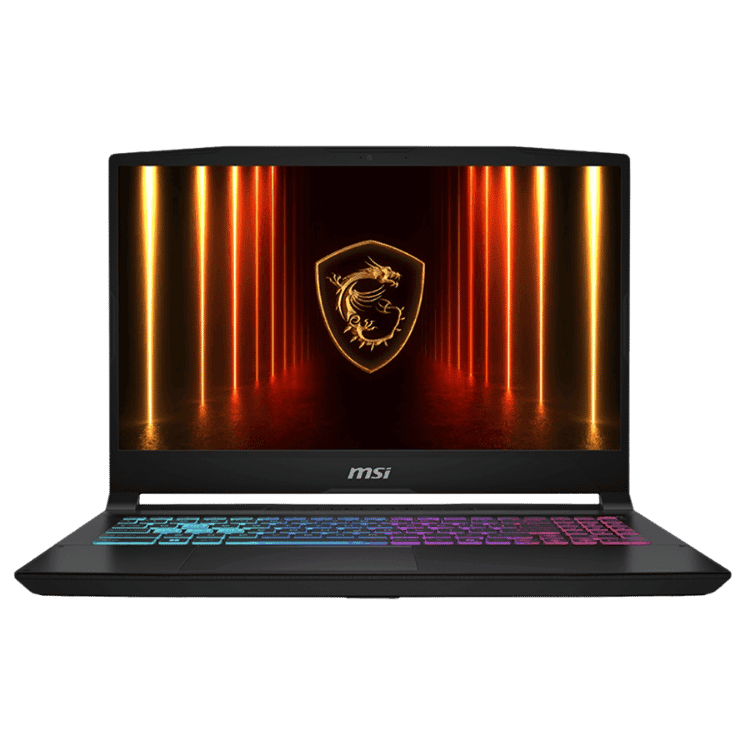
The MSI Katana RTX 5070 is an example of a laptop that can be positioned as both a gaming laptop and a performance work laptop. It suits users who need dedicated graphics and stronger performance than a normal office laptop.
Windows Work Laptop
A Windows work laptop is the most common choice for Australian businesses because it supports a wide range of business software, accounting platforms, Microsoft Office, browser-based tools and accessories. Windows 11 is widely used for office work, business productivity, study and remote work.
Microsoft’s Windows 11 information is available here: https://www.microsoft.com/en-au/windows/windows-11.
Microsoft Office Laptop
A Microsoft Office laptop should comfortably run Word, Excel, Outlook, PowerPoint, Teams and OneDrive. Many basic laptops can open Office apps, but heavier users need enough RAM and storage for smooth multitasking.
Users who work in Excel, Outlook, Teams and browsers at the same time should consider a laptop with stronger specifications. Microsoft 365 information is available here: https://www.microsoft.com/en-au/microsoft-365.
Laptop with Microsoft Office
CAA Computers can help customers choose a laptop with Microsoft Office options depending on their needs. Some customers need Office for school or university, while others need it for business documents, email, spreadsheets, presentations and team collaboration.
Before buying, it is important to understand whether you need Microsoft Office, Microsoft 365, Outlook, Teams, OneDrive or other business tools.
Windows 11 Work Laptop
A Windows 11 work laptop is suitable for office users, business owners, students, remote workers and professionals who need modern productivity features and wide software compatibility. Windows 11 laptops are available in budget, mid-range, premium and performance categories.
Choosing the right Windows 11 laptop depends on the work being done. Basic users can choose a value laptop, while heavy users may need more RAM, better processors or dedicated graphics.
2 in 1 Work Laptop
A 2 in 1 work laptop can be useful for students, mobile workers, business owners and users who want touchscreen flexibility. A 360-degree hinge allows the laptop to be used in different modes, which can be helpful for presentations, reading, note-taking and flexible desk use.
The Lenovo IdeaPad Flex 5 is an example of a value-focused 2-in-1 laptop suitable for students, light business use and everyday productivity.
Touchscreen Work Laptop
A touchscreen work laptop can be useful for users who prefer tapping, scrolling, presenting or taking notes directly on the screen. Touchscreen laptops are popular with students, business users, consultants and people who want more flexibility than a standard laptop.
Not every work user needs a touchscreen, but it can be a useful feature depending on the workflow.
Portable Work Laptop
A portable work laptop is ideal for users who move between home, office, meetings, university, client sites and travel. Smaller laptops are easier to carry, while larger laptops give more screen space. A 13-inch laptop is good for portability, a 14-inch laptop balances size and usability, and a 15-inch laptop is better for users who want more screen area.
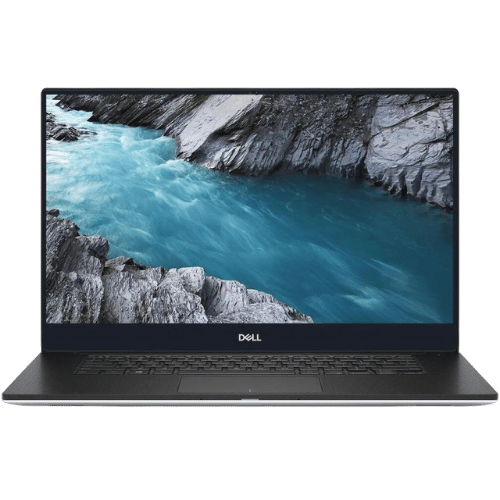
The Dell XPS 13 is a strong example of a premium portable work laptop for users who want a compact professional device.
13 Inch Work Laptop
A 13 inch work laptop is suitable for business owners, consultants, real estate agents, students and professionals who prioritise portability. It is easier to carry and fits well into bags, making it a good choice for mobile users.
A 13 inch laptop is not always ideal for users who spend all day working without an external monitor, but it can be excellent when paired with a larger screen at the desk.
14 Inch Work Laptop
A 14 inch work laptop is a strong balance between portability and usability. It gives more screen space than a 13-inch laptop while still being easier to carry than many 15-inch models. This size is popular for business, study and remote work.
15 Inch Work Laptop
A 15 inch work laptop is suitable for users who want more screen space for documents, spreadsheets, admin work, video calls and general productivity. It can be better for users who work mostly at a desk and do not want to rely on an external monitor.
The ASUS Vivobook Go 15 is an example of a 15-inch laptop option for everyday work and study use.
Best Budget Work Laptop
The best budget work laptop should still be reliable enough for daily use. A cheap laptop that is too slow can cost more in frustration and lost time. For budget work laptops, buyers should still look for SSD storage, a practical processor, enough RAM and Windows 11 compatibility.
CAA Computers can help customers find budget work laptops that suit simple office, study and business tasks without overpaying for unnecessary features.
Budget Business Laptop
A budget business laptop is suitable for light office work, emails, invoices, browsing, Microsoft Office, admin tasks and small business use. Budget business laptops are useful for startups, students, sole traders and staff who do not need high-end performance.
However, business buyers should avoid going too low if the laptop will be used every day for serious work. Spending slightly more on the right model can improve speed and lifespan.
Premium Business Laptop
A premium business laptop is better for users who want stronger performance, better portability, a professional design and a more comfortable daily experience. Premium laptops are suitable for business owners, consultants, managers, accountants, real estate agents and professionals who rely on their laptop every day.
The Dell XPS 13 9350 i7 is a good example of a premium portable laptop for professional users.
Best Laptop Specs for Work
The best laptop specs for work depend on the workload. For basic office use, a modern processor, 8GB RAM and SSD storage may be enough. For heavier multitasking, 16GB RAM and 512GB SSD are usually better. For video editing, CAD, design and rendering, dedicated graphics and stronger cooling may be required.
Buyers should consider CPU, RAM, storage, screen size, battery life, graphics, ports, weight and warranty before choosing a work laptop.
Is 8GB RAM Enough for a Work Laptop?
8GB RAM can be enough for light work such as browsing, email, documents, online study and basic admin. However, users who run many tabs, spreadsheets, Teams, Outlook, accounting software and other apps at the same time may benefit from 16GB RAM.
For long-term business use, 16GB RAM is often a safer choice where the budget allows.
Is 16GB RAM Better for Business Laptops?
16GB RAM is better for business laptops used for multitasking, large spreadsheets, multiple browser tabs, accounting software, creative apps and heavier daily workloads. It can help the laptop feel smoother and more capable over time.
Business users who rely on their laptop every day should consider 16GB RAM if they want stronger long-term performance.
Is 256GB SSD Enough for Work?
A 256GB SSD can be enough for light users who store most files in the cloud. However, 512GB SSD is usually a better choice for work laptops because business files, downloads, documents, photos, apps and Windows updates can take up space.
Users working with photos, videos, design files or large downloads should consider even more storage where available.
512GB SSD Work Laptop
A 512GB SSD work laptop is a practical choice for many business, office, student and remote work users. It gives more breathing room than 256GB while keeping the laptop fast and responsive.
For professional work, storage should not be treated as an afterthought. Running out of space can slow down workflow and create unnecessary problems.
Laptop for Multiple Monitors
A laptop for multiple monitors should have the right ports, graphics capability and docking support. Many business users prefer working with one or two external monitors because it improves productivity, especially for spreadsheets, accounting, admin, design and remote work.
CAA Computers can help customers plan a work laptop setup with monitors, keyboard, mouse, dock or USB-C hub.
Laptop Docking Setup
A laptop docking setup allows a work laptop to connect to a monitor, keyboard, mouse, Ethernet and other accessories through one main connection. This is useful for business users who want portability and a full desk setup.
Remote workers, office staff, accountants, managers and business owners often benefit from docking setups because they make laptop work more comfortable.
Work Laptop Setup
A complete work laptop setup may include the laptop, Microsoft Office, external monitor, keyboard, mouse, dock, webcam, headset, backup drive and security software. The right setup can make daily work faster and more comfortable.
CAA Computers can help customers think beyond the laptop itself and choose accessories that suit the way they work.
Laptop for Staff
A laptop for staff should be reliable, easy to use and suitable for the role. Staff laptops may be used for admin, sales, customer service, bookkeeping, operations, management, remote work or creative tasks. Choosing the same laptop for every staff member is not always the best approach because different roles may need different specifications.
CAA Computers can help businesses choose staff laptops based on job requirements and budget.
Business Laptop Packages
Business laptop packages may include the laptop, setup advice, Office options, accessories and multiple devices for staff. CAA Computers can help businesses source laptops for individual employees or teams depending on availability and requirements.
This is useful for businesses that do not want to waste time comparing models across multiple retailers.
Laptop Supplier Sydney
CAA Computers is a laptop supplier in Sydney offering work laptops, business laptops, student laptops, gaming laptops and performance laptops. Customers can contact CAA for help choosing a laptop based on workload, budget and preferred brand.
Rather than only selling a product, CAA Computers helps customers understand what laptop makes sense for their actual use.
Laptop Supplier Australia
CAA Computers supplies laptops across Australia where available. Customers outside Sydney can still contact CAA for laptop options, work laptop advice and product recommendations.
Australia-wide customers can shop laptop products online or contact CAA Computers for help choosing the right model.
Lenovo Work Laptop
Lenovo laptops can be suitable for work, study, business and flexible productivity depending on the model. The Lenovo IdeaPad Flex 5 is a practical option for users who want a 2-in-1 touchscreen laptop for study, admin, light business use and everyday work.
Lenovo support information is available here: https://support.lenovo.com/au/en.
ASUS Work Laptop
ASUS laptops can be suitable for everyday work, study, office tasks and business use depending on the model. The ASUS Vivobook Go 15 is an example of a value-focused laptop for daily productivity, emails, documents, browsing and student/work use.
ASUS support information is available here: https://www.asus.com/au/support/.
Dell Work Laptop
Dell laptops are popular with business and professional users. A compact Dell laptop such as the Dell XPS 13 9350 i7 can suit users who want a premium, portable laptop for meetings, remote work, business use and productivity.
Dell support information is available here: https://www.dell.com/support/home/en-au.
MSI Work Laptop
MSI laptops are often known for gaming, but many MSI models are also suitable for high-performance work. RTX gaming laptops can be useful for creators, video editors, designers, streamers, 3D users and professionals who need more graphics performance than a basic office laptop.
MSI support information is available here: https://au.msi.com/support.
MacBook for Work
MacBooks can be suitable for work, design, business and content creation depending on software requirements and budget. CAA Computers can help source MacBooks on request where suitable, but we may also recommend a Windows work laptop if it provides better value, compatibility or performance for the user’s needs.
The best choice between a MacBook and Windows laptop depends on software, workflow, budget, storage, accessories and personal preference.
Windows Laptop vs MacBook for Work
Choosing between a Windows laptop and a MacBook for work depends on the user’s software and workflow. Windows laptops are common for Microsoft Office, accounting platforms, business software, gaming, wide accessory compatibility and value across many price points. MacBooks can suit users already in the Apple ecosystem or working in certain creative fields.
CAA Computers can help customers compare practical options instead of choosing based on brand alone.
Buy Work Laptop Australia
If you want to buy a work laptop in Australia, CAA Computers can help you choose from budget, premium, 2-in-1, office, business and high-performance laptop options. The goal is to match the laptop to your work so you get a device that feels reliable and practical.
Customers can shop online or contact CAA Computers for advice before buying.
Buy Work Laptop Sydney
If you want to buy a work laptop in Sydney, CAA Computers provides local support and product advice. Sydney customers can contact CAA for help choosing a laptop for business, office work, study, remote work or creative workloads.
CAA Computers can help with one laptop or multiple laptops depending on your business needs.
Why Choose CAA Computers for Work Laptops?
CAA Computers helps customers choose work laptops based on real requirements. Instead of pushing one model for everyone, we look at how the laptop will be used. This includes software, portability, screen size, RAM, storage, performance, budget and whether the laptop needs to support accessories or external monitors.
CAA Computers supplies work laptops, business laptops, office laptops, student laptops, gaming laptops and performance laptops across Sydney and Australia. Contact CAA Computers on 0459 681 726, email chender@caacomputers.com.au or email chender@caacomputers.com.au for help choosing the right work laptop.