

CAD Workstation Australia.
Built for the software and models you actually use.
CAD computers for AutoCAD, Revit, SolidWorks, Fusion 360 and professional 3D design. From 2D drafting to large BIM models and heavier engineering work, CAA matches the CPU, GPU, RAM and storage to the workload.
What kind of CAD work do you do?
One workstation page. The software terms buyers actually search.
AutoCAD, Revit, SolidWorks, Fusion 360, Inventor and Civil 3D can overlap, but the best hardware balance changes with the application and project.
 AutoCAD
 Revit
Revit SolidWorks
 Fusion 360
 Inventor
 Civil 3D
AutoCAD System Requirements
Official Autodesk guidance for processor, memory and graphics requirements for current AutoCAD releases.
AutoCAD Requirements ↗Revit System Requirements
Useful for understanding how memory and workstation requirements increase with larger and more complex BIM models.
Revit Requirements ↗SOLIDWORKS Requirements
Official hardware guidance including memory recommendations and certified graphics-card and driver requirements.
SOLIDWORKS Requirements ↗Start with the Creator. Move up as the models get heavier.
The workstation ladder starts with a capable Creator PC for lighter CAD, steps up to the CAA Engineering & Render Pro Workstation for stronger 3D CAD, BIM and rendering workloads, then moves into the Engineering & Creative Powerhouse for larger professional projects.

2D CAD • Light 3D • Design
CAA Creator Work PC
- Intel Core Ultra 5 processor
- NVIDIA GeForce RTX 5060 graphics
- 16GB DDR5 memory
- 1TB NVMe SSD
- Suitable starting point for lighter CAD and creator workloads
The entry workstation for users who need more than a basic office PC for drafting, design and lighter 3D work.
View Creator CAD PC
3D CAD • Revit • Rendering
CAA Engineering & Render Pro Workstation
- AMD Ryzen 7 7800X3D – 8 Core / 16 Thread
- NVIDIA GeForce RTX 5070 12GB
- 32GB DDR5 memory
- 1TB NVMe SSD
- MSI B650 WiFi platform
- Fractal Design North case
The recommended middle tier for AutoCAD, Revit, SolidWorks, Fusion 360, 3D modelling and rendering workloads that need more performance than the Creator PC.
View Engineering & Render Pro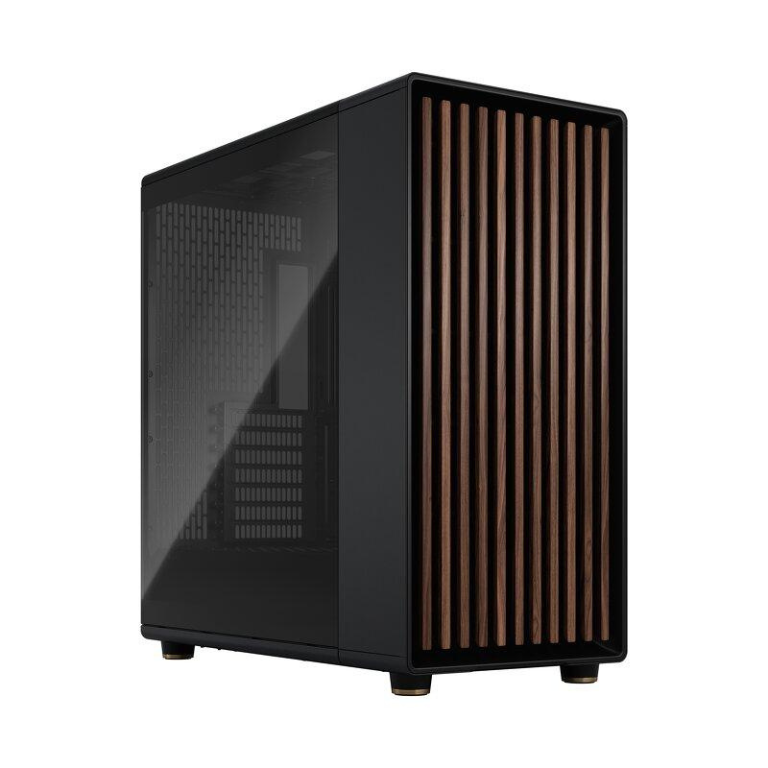
Large Projects • CAD • Engineering
Engineering & Creative Powerhouse
- High-end workstation platform
- Built for heavier professional workloads
- Suitable for larger CAD, BIM and creative projects
- Designed for engineers, architects and power users
- Custom upgrades available where required
For customers whose work extends beyond ordinary drafting into large models, demanding 3D projects and heavier professional engineering workloads.
View High-End CAD WorkstationThe best PC for CAD depends on what you actually design.
| Workflow | CPU Priority | Memory | Graphics | CAA Starting Point |
|---|---|---|---|---|
| 2D AutoCAD / drafting | High clock / strong single-thread | 16–32GB | Modest dedicated GPU often enough | Creator Work PC |
| 3D AutoCAD / Fusion 360 | Fast CPU + balanced system | 32GB preferred | Mid-range or stronger GPU | Engineering & Render Pro |
| Revit / BIM | Fast CPU + multicore support | 32–64GB+ | Capable dedicated GPU | Render Pro / Powerhouse |
| SolidWorks / assemblies | Fast CPU | 32GB+ | Certified workstation GPU can matter professionally | Render Pro / Powerhouse |
| Large BIM / engineering | High-performance platform | 64GB+ where required | Strong / professional GPU | Engineering & Creative Powerhouse |
| Rendering / simulation | More CPU cores may matter | 64GB+ | Strong GPU depending on software | Custom Quote |
Spend money on the bottleneck — not the biggest number.
AutoCAD Still Feels Slow
Buying more CPU cores does not automatically make normal drafting faster. Many CAD operations benefit heavily from strong per-core performance.
3D Viewport Is Choppy
Large models, visual styles, display resolution and GPU capability can all affect viewport responsiveness. 3D users usually have more reason to invest in graphics than 2D users.
Revit Models Keep Growing
As BIM projects become larger and more complex, memory requirements can rise significantly. A workstation should be sized for the projects you actually open.
SolidWorks Driver Issues
Professional users may value certified graphics and validated drivers where stability and vendor support matter more than gaming-focused benchmark value.
Large Files Take Too Long
Fast NVMe storage improves general responsiveness and can reduce unnecessary storage bottlenecks when opening and working with large project files.
One PC For Too Many Apps
Architects and engineers often move between CAD, BIM, rendering, Adobe and browser-based tools. Memory and overall system balance matter when everything stays open together.
Before you choose a CAD computer.
What is the best PC for AutoCAD?
For many AutoCAD workflows, strong single-thread CPU performance matters more than simply buying the processor with the highest core count. 3D users should also place more emphasis on GPU performance.
How much RAM do I need for CAD?
16GB can suit lighter CAD, while 32GB is a stronger professional starting point. Large Revit models, assemblies and multi-application engineering work can justify 64GB or more.
Do I need an RTX PRO graphics card for CAD?
Not always. GeForce GPUs can offer strong value for many workloads. Professional environments may prefer workstation graphics where certified drivers and validated application support are important.
Is the Creator Work PC enough for AutoCAD?
It is the entry point on this page for lighter CAD, drafting and creator workloads. Larger 3D models, Revit projects and heavier engineering work are better matched to the higher workstation tiers.
Can CAA build a custom CAD workstation?
Yes. CAA can configure a workstation around AutoCAD, Revit, SolidWorks, Fusion 360, project sizes, display setup, storage requirements and budget.
Tell us the software and project size. We’ll build around it.
Include the CAD/BIM applications you use, typical model size, whether the work is 2D or 3D, how much rendering or simulation you do, your monitor setup and your budget.
Read More: CAD Workstation Australia Buying Guide
CAD Workstation Australia – Choosing the Right CAD Computer
A cad workstation australia buyer should choose hardware around the software, model size and type of design work rather than simply buying the desktop with the largest specification. AutoCAD 2D drafting, Revit BIM, SolidWorks assemblies, Fusion 360 modelling and rendering can place very different demands on the CPU, GPU, RAM and storage.
What Makes a Good CAD Workstation?
A strong cad workstation australia build needs balance. Many CAD tasks benefit from fast CPU performance, but 3D viewports, visualisation and GPU-accelerated workloads can also require a capable graphics card. Memory capacity becomes increasingly important as projects, assemblies and BIM models grow.
Best PC for AutoCAD
The best cad workstation australia for AutoCAD is not automatically the machine with the highest core count. Much of normal drafting and modelling benefits from strong single-thread processor performance. A fast SSD and enough RAM also help keep projects and applications responsive.
For buyers searching for the best PC for AutoCAD, the right cad workstation australia depends heavily on whether the work is mostly 2D drafting or larger 3D models. 2D users can often spend less on graphics, while 3D users have more reason to invest in the GPU.
CAD Computer for 2D Drafting
A lighter cad workstation australia can be a good fit for AutoCAD 2D, technical drawings, joinery plans, floor plans and general drafting. The Creator Work PC is the entry point on this page for users who need more capability than a basic office desktop without immediately moving into a larger engineering workstation.
3D CAD Workstation
As the workload moves into 3D modelling, larger assemblies and more demanding visualisation, a cad workstation australia should place more emphasis on GPU capability, memory capacity and fast project storage. This is where the CAA Engineering & Render Pro Workstation becomes the more appropriate starting point.
Revit Workstation Australia
Revit projects can become increasingly memory intensive as model complexity grows. A cad workstation australia used for BIM should therefore be specified around the size of the projects being opened every day, not only around minimum software requirements.
SolidWorks Workstation
Professional SolidWorks users should consider graphics-driver support as well as raw performance. A cad workstation australia for professional SolidWorks environments may justify a workstation-class or certified graphics option where driver validation and vendor support are important.
Fusion 360 and Inventor
Fusion 360 and Inventor users often need a balanced cad workstation australia with fast CPU performance, sufficient memory, capable graphics and fast SSD storage. More complex assemblies, rendering and simulation can push the required specification higher.
How Much RAM Does a CAD PC Need?
Memory requirements vary by project. A lighter cad workstation australia may be usable with 16GB, while 32GB is a much more comfortable starting point for professional 3D design and many BIM workloads. Larger Revit projects, large assemblies and multi-application engineering workflows can justify 64GB or more.
CAD PC Storage
Fast NVMe storage is useful in a cad workstation australia because operating systems, applications and large project files all benefit from responsive storage. Higher-end users may also benefit from separating Windows and applications from active project data, scratch files or archive storage.
Gaming GPU vs Workstation GPU for CAD
A GeForce GPU can offer excellent performance and value in many CAD workflows, but professional software environments may place more importance on certified drivers and validated workstation graphics. A cad workstation australia should therefore be configured around the software policy and support requirements of the business as well as the raw benchmark performance.
Best Desktop Computer for CAD Design
The best desktop computer for CAD design is one that matches the actual workload. A cad workstation australia for kitchen joinery and 2D plans does not need to be identical to a workstation for large Revit models, SolidWorks assemblies, architectural visualisation or simulation.
CAD Workstation for Architects
Architects may combine AutoCAD, Revit, SketchUp, rendering tools and large drawing sets. Their cad workstation australia therefore needs enough CPU performance, RAM, graphics capability and storage to move between applications without one weak component limiting the workflow.
CAD Workstation for Engineers
Engineering workloads can extend beyond CAD into rendering, simulation and calculation. A cad workstation australia for this type of work may require more CPU cores, more memory and stronger GPU hardware than a drafting-only system.
Custom CAD Workstation Australia
CAA Computers can configure a cad workstation australia around AutoCAD, Revit, SolidWorks, Fusion 360, Inventor, SketchUp and other professional applications. Tell us the software, typical project size, display setup and budget so the workstation can be designed around the actual work.
Compare broader professional systems on Work Computers Australia, or request a tailored system through the Custom Computer Builder.
A properly matched cad workstation australia should prioritise the parts that actually affect the user's daily software and model complexity.
A properly matched cad workstation australia should prioritise the parts that actually affect the user's daily software and model complexity.
A properly matched cad workstation australia should prioritise the parts that actually affect the user's daily software and model complexity.
A properly matched cad workstation australia should prioritise the parts that actually affect the user's daily software and model complexity.
A properly matched cad workstation australia should prioritise the parts that actually affect the user's daily software and model complexity.
A properly matched cad workstation australia should prioritise the parts that actually affect the user's daily software and model complexity.
A properly matched cad workstation australia should prioritise the parts that actually affect the user's daily software and model complexity.