

Engineering Workstation Australia.
Built for modelling, simulation, rendering and real engineering workloads.
Professional engineering computers for SolidWorks, MATLAB, Fusion 360, Revit, AutoCAD, rendering and analysis. CAA matches the CPU, GPU, RAM and storage to the software and size of the work.
Engineering is not one workload.
Creator → Render Pro → Powerhouse.
Start with the Creator PC for lighter engineering and modelling, move to the Engineering & Render Pro for stronger CAD, rendering and professional work, then step up to the Engineering & Creative Powerhouse for larger and heavier engineering workloads.

Light Engineering • Modelling • General Work
CAA Creator Work PC
A sensible entry point for lighter modelling, technical work and engineering users who need more than a standard office computer.
View Creator Work PC
CAD • Rendering • Engineering • MATLAB
CAA Engineering & Render Pro Workstation
- AMD Ryzen 7 7800X3D – 8 Core / 16 Thread
- NVIDIA GeForce RTX 5070 12GB
- 32GB DDR5 memory
- 1TB NVMe SSD
- MSI B650 Wi-Fi platform
- DeepCool AK620 cooling
- Fractal Design North case
- MSI MAG 750W power supply
The recommended middle tier for engineers, architects and designers working across CAD, BIM, rendering, MATLAB and professional creative applications.
View Engineering & Render Pro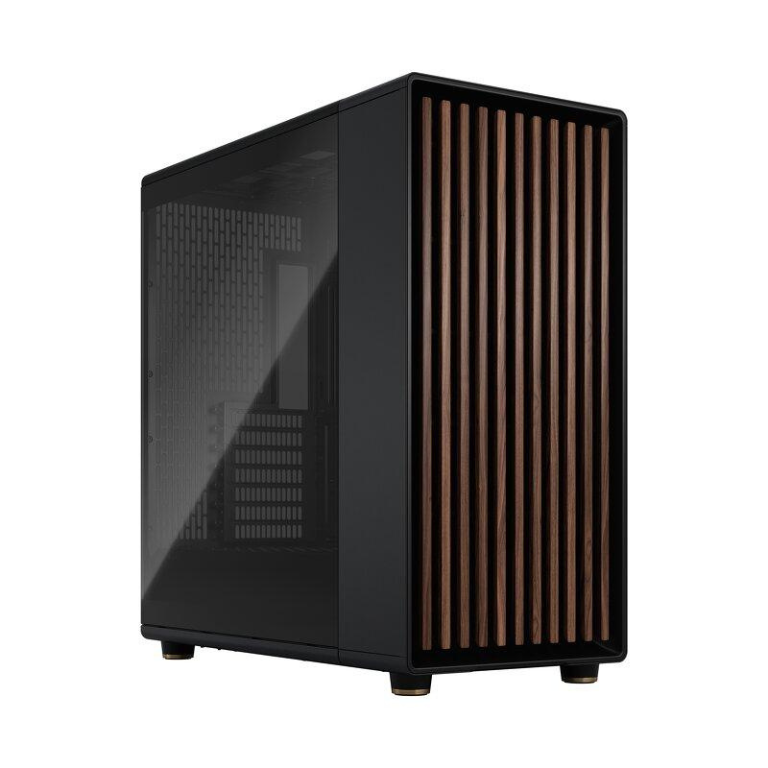
Large Projects • Heavy Workloads • Professional Use
Engineering & Creative Powerhouse
The high-end option for customers whose engineering workload extends beyond ordinary modelling into larger datasets, complex projects, rendering and heavier professional workloads.
View Engineering PowerhouseBuy for the bottleneck — not the biggest spec sheet.
| Workload | Main Priority | Memory | GPU | CAA Starting Point |
|---|---|---|---|---|
| Light CAD / modelling | Fast CPU response | 16–32GB | Capable dedicated GPU | Creator Work PC |
| SolidWorks / Fusion / Revit | Balanced CPU + RAM + GPU | 32GB+ | Strong GPU / certified option where required | Engineering & Render Pro |
| MATLAB / Simulink | CPU + RAM + workload-specific compute | 16–64GB+ | GPU if workload/toolbox benefits | Creator / Render Pro |
| Rendering / visualisation | GPU + VRAM | 32–64GB+ | Strong NVIDIA GPU | Engineering & Render Pro |
| Large assemblies / BIM | RAM + strong CPU | 64GB+ where required | Strong / professional GPU | Powerhouse |
| FEA / CFD / heavy simulation | Solver-specific CPU, RAM or GPU | 64GB+ common for large jobs | Depends on solver | Custom / Powerhouse |
The right workstation depends on what is slowing you down.
Large Models Use All The RAM
Assemblies, BIM and simulation datasets can quickly outgrow entry-level memory configurations. Size the workstation around real project sizes.
Simulation Takes Too Long
More cores can help some solvers, but not every solver scales the same way. CPU architecture, RAM and GPU support need to match the application.
Viewport / Rendering Is Slow
3D visualisation and rendering can shift the bottleneck toward GPU performance and VRAM, especially in real-time renderers.
MATLAB Dataset Is Too Large
General MATLAB requirements are modest, but engineering datasets and toolbox workloads can justify much more memory and compute capability.
One Engineer Uses Five Apps
SolidWorks, MATLAB, browsers, PDFs, Office and rendering tools open together can make memory capacity and overall balance more important than one headline component.
Gaming PC or Workstation?
Consumer GPUs can offer strong value, while certified professional graphics may matter where validated drivers and vendor support are required.
Ground the build in the software vendor’s own guidance.
System Requirements
SOLIDWORKS lists 16GB RAM minimum, 32GB recommended, SSD storage and certified graphics cards and drivers.
SOLIDWORKS Requirements ↗MATLAB Requirements
MATLAB R2026a recommends 16GB RAM, an AVX2-capable x86-64 processor and SSD storage; larger engineering workloads may require more.
MATLAB Requirements ↗CAD Workstation Australia
If your main workload is AutoCAD, Revit, drafting or general CAD rather than simulation/compute, use the dedicated CAD buying page.
View CAD Workstations →Before you choose the system.
What is the best computer for engineering?
The best workstation depends on your software. CAD, MATLAB, rendering and simulation can stress different components, so the workstation should be configured around the actual workload.
How much RAM does an engineering workstation need?
32GB is a strong professional starting point for many engineering users. Large assemblies, BIM, simulation datasets and heavy multitasking can justify 64GB or more.
Do I need a workstation GPU?
Not always. Consumer NVIDIA GPUs can provide strong performance and value. Professional workstation graphics become more important where certified drivers, application validation or vendor support are required.
Is the Engineering & Render Pro suitable for engineering work?
Yes. It is the recommended middle-tier system on this page, with Ryzen 7 7800X3D, RTX 5070 12GB, 32GB DDR5 and 1TB NVMe storage.
Can CAA build a custom engineering workstation?
Yes. CAA can configure the system around your software, simulation or rendering workload, project size, RAM, storage and budget.
Tell us the software, model size and compute workload.
Include the programs you use, typical project or dataset size, whether you render or simulate, whether GPU compute is required, your display setup and your budget.
Read More: Engineering Workstation Australia Buying Guide
Engineering Workstation Australia – Choosing the Right Engineering Computer
An engineering workstation australia buyer should choose hardware around the actual software, dataset size and engineering workload rather than simply purchasing the computer with the largest specification. CAD, simulation, MATLAB, rendering, BIM, modelling and analysis can stress very different parts of a workstation.
What Makes a Good Engineering Workstation?
A strong engineering workstation australia needs balance between processor performance, graphics, memory and storage. Some engineering applications benefit most from high single-core speed, while rendering, simulation and compute tasks may make better use of additional CPU cores or GPU acceleration.
Engineering Computer for CAD and 3D Modelling
An engineering workstation australia used mainly for CAD and modelling should prioritise fast CPU performance, enough memory for the project size, a capable graphics card and fast NVMe storage. This is different from a workstation intended primarily for long simulations or rendering.
Engineering Workstation for SolidWorks
SOLIDWORKS recommends 32GB RAM for current professional use and certified graphics cards and drivers for supported environments. An engineering workstation australia for large assemblies should therefore consider memory capacity and graphics-driver support as well as raw CPU and GPU performance.
MATLAB Workstation Australia
MathWorks currently recommends 16GB RAM and an SSD for MATLAB itself, but an engineering workstation australia running larger datasets, toolboxes, Simulink models or GPU-accelerated workloads may need substantially more memory, storage and compute capability than MATLAB's general recommendation.
Simulation and Analysis Workstation
Simulation workloads can vary dramatically. An engineering workstation australia running FEA, CFD or other analysis should be configured around the solver, model size and whether the application scales across CPU cores or can use GPU acceleration.
Engineering Workstation for Rendering
Engineers and architects increasingly combine modelling with visualisation. An engineering workstation australia that also runs Lumion, Twinmotion, Blender, V-Ray, Enscape or Unreal Engine can benefit from stronger GPU performance and additional VRAM.
How Much RAM Does an Engineering Workstation Need?
Memory depends on the workload. A lighter engineering workstation australia may be comfortable at 16GB to 32GB, while larger CAD assemblies, Revit projects, simulation datasets and multi-application workflows can justify 64GB or more.
CPU or GPU for Engineering?
There is no single answer for every engineering workstation australia. CAD and modelling often benefit from fast CPU responsiveness, while rendering, visualisation and some compute workloads can make heavy use of the GPU. Simulation may depend more on CPU cores, memory bandwidth or specialised acceleration depending on the software.
Engineering Workstation Storage
Fast NVMe storage helps an engineering workstation australia remain responsive when opening applications, loading project files and working with large datasets. Higher-end users may benefit from separate drives for Windows and software, active projects, scratch/cache data and archives.
Engineering Workstation vs CAD Workstation
The CAD Workstation Australia page focuses on drafting, BIM and 3D design. This engineering workstation australia page goes further into simulation, analysis, rendering, MATLAB, large engineering projects and heavier multi-application workloads.
Engineering Workstation for Architects and Designers
Architecture and design workflows often combine Revit, AutoCAD, SketchUp, rendering and Adobe applications. An engineering workstation australia for this work should be balanced enough to move between modelling, documentation and visualisation without one weak component becoming a bottleneck.
Engineering Workstation for Large Projects
Larger projects can require more RAM, more storage and stronger CPU or GPU performance. An engineering workstation australia should therefore be sized around the biggest project the user regularly opens, not just the minimum requirements printed by the software vendor.
Custom Engineering Workstation Australia
CAA Computers can configure an engineering workstation australia around SolidWorks, MATLAB, Fusion 360, Revit, AutoCAD, rendering applications and engineering simulation tools. Tell us the software, model size, datasets, rendering requirements, monitor setup and budget so the system can be matched to the work.
For broader professional systems, visit Work Computers Australia, or request a tailored system through the Custom Computer Builder.
A properly matched engineering workstation australia should put the budget into the components that affect the user's real engineering workload.
A properly matched engineering workstation australia should put the budget into the components that affect the user's real engineering workload.
A properly matched engineering workstation australia should put the budget into the components that affect the user's real engineering workload.