

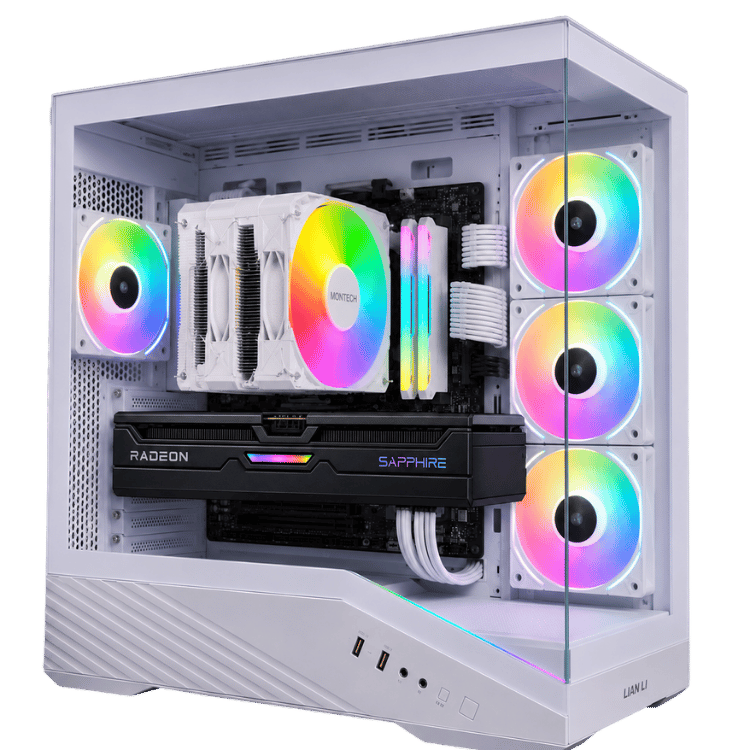

CAA WHITE FANG / THE HARDWARE INSIDE
Looking for the best gaming PC under 3000?
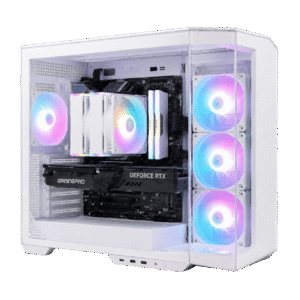
White Fang combines Ryzen X3D processing, Radeon RX 9070 graphics and a white Lian Li case. Explore the full specification before choosing the configuration for your next gaming setup.
| Processor | AMD Ryzen 7 7800X3D — 8 cores / 16 threads |
|---|---|
| Graphics | Gigabyte GAMING OC Radeon RX 9070 16GB — black |
| Memory | TEAMGROUP T-Force Delta RGB 16GB (2 × 8GB) DDR5-6000 CL38 |
| Storage | Kingston NV3 1TB M.2 PCIe 4.0 NVMe SSD |
| Motherboard | MSI B850M GAMING PLUS WIFI6E — AM5, Micro ATX |
| CPU cooler | Montech NX600 ARGB — white air cooler |
| Case | Lian Li Vector V100R — white |
| Power supply | MSI MAG A650BNL 650W 80+ Bronze — white |
| Windows | Windows 11 Home installed and activated |
| Preparation | Assembled, drivers installed, configured for gaming and stress-tested |
| Warranty | 1-year return-to-base warranty included; optional 2- and 3-year coverage |
Standard tower: $2,999 before shipping and optional upgrades. Monitor, keyboard, mouse and games are separate unless added to your order.
WHITE FANG / MADE FOR GAME NIGHT
Play with power.
Build your setup.
Ryzen 7 7800X3D processing meets Radeon RX 9070 16GB graphics in a clean white RGB desktop. From competitive shooters to detailed single-player worlds, White Fang is built for gamers who care about the experience on screen.
Comparing the best gaming PC under 3k? Start with a clearly specified desktop, activated Windows and professional preparation by CAA Computers.
Explore your options ↓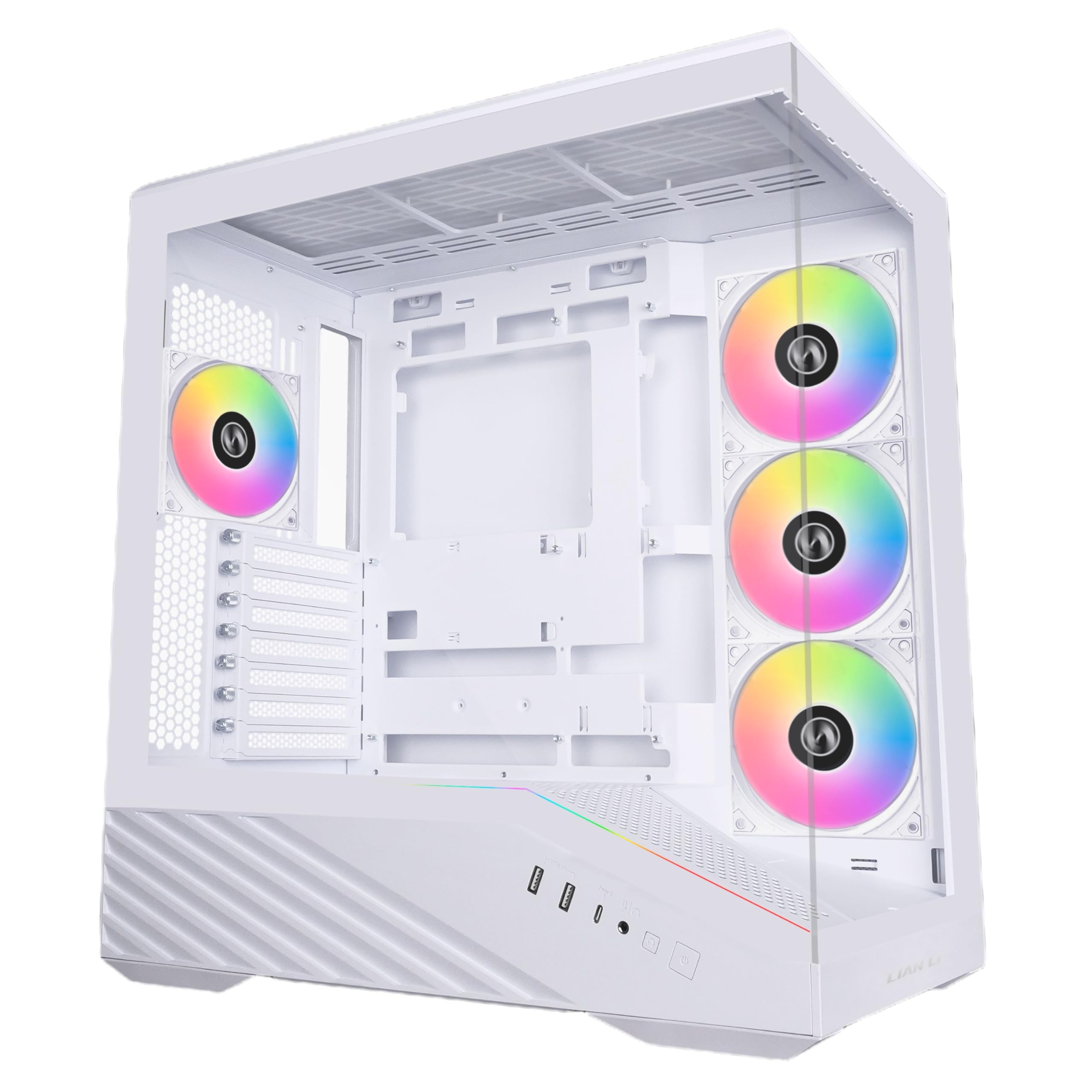

Radeon RX 9070 16GB
Gigabyte GAMING OC graphics for White Fang.
Montech NX600 ARGB
White air cooling with RGB lighting.
Gaming-focused processing
AMD Ryzen 7 7800X3D brings eight cores, sixteen threads and 3D V-Cache technology to the games you play.
16GB Radeon graphics
The Gigabyte RX 9070 delivers a strong foundation for 1440p gaming, with the flexibility to explore 4K using suitable settings.
Activated and prepared
Windows 11 Home is installed and activated. Drivers, system configuration and testing are completed before dispatch.
Choose the cover for your setup.
- 1-year return-to-base warranty: included.
- 2-year warranty: add $99.
- 3-year warranty: add $149.
Choose your warranty through the product options above before adding White Fang to cart. Physical inspections and repairs take place at CAA Computers under the return-to-base service.
Want a white Radeon RX 9070 XT? Contact us about the advertised $300 upgrade and confirm the complete upgraded configuration before ordering.
Shipping and options increase the total above the $2,999 base price. The advertised GPU upgrade brings the tower price to $3,299 before shipping. Warranty terms apply; Australian Consumer Law rights remain unaffected.
EXPLORE WHITE FANG
Your $3000 gaming PC, explained.
Read more: Best gaming PC under 3000 — performance, parts & FAQs
Choosing the best prebuilt gaming PC under $3000
Choosing the best gaming PC under 3000 starts with your games, your screen and the way you like to play. This best gaming PC under 3000 is built around a Ryzen 7 7800X3D processor and RX 9070 graphics card, with a white case and RGB presentation. The aim is a desktop that feels at home in both a competitive setup and a visually detailed gaming space.
When comparing the best gaming PC under 3000, examine the entire component list. Processor, graphics, memory capacity, storage and the included Windows setup all contribute to what arrives. A short headline cannot explain the motherboard model or how much storage remains after installing Windows and games. Named components help you make a more informed comparison.
The standard White Fang tower is $2,999, so the best gaming PC under 3000 budget applies to the base system before shipping and optional changes. A longer warranty, a graphics upgrade or additional accessories changes the total. Use the checkout figure when comparing the complete purchase with another store.
There is no universal best gaming PC under 3000 for every buyer. Someone who mainly plays competitive games may value processor performance differently from someone who wants to record footage, run heavily modified games or maintain a large library. Share your monitor model, favourite games and intended settings with us if you want help choosing.
Best gaming computer under 3000: Ryzen X3D processing
The Ryzen 7 7800X3D is a major reason to consider this best gaming PC under 3000 when researching the best gaming PC under 3000. It combines eight CPU cores and sixteen threads with AMD 3D V-Cache technology. Games that benefit from additional cache can use that design to improve performance, although the result depends on the particular workload.
Comparing the best gaming PC under 3000? CPU performance matters when a game needs to process busy scenes, player actions and game logic quickly. Lower graphical settings can also make processor limitations more noticeable because the graphics card has less work to do. A capable CPU is therefore useful for competitive setups as well as demanding modern games.
This best gaming PC under 3000 pairs its X3D processor with a dedicated Radeon graphics card rather than treating either component as the entire system. When comparing the best gaming PC under 3000, think about that combination and how it relates to your display. Different games stress the CPU and GPU in different ways.
Comparing the best gaming PC under 3000? The processor also handles everyday applications, communication software and multitasking. If heavy professional rendering or another specialist CPU workload is your main priority, discuss the application with CAA Computers before purchase. A gaming-focused configuration and a workstation-focused configuration can prioritise different components.
Gigabyte Radeon RX 9070 16GB graphics
The Gigabyte GAMING OC Radeon RX 9070 supplies 16GB GDDR6 graphics memory. For shoppers comparing the best gaming PC under 3000, the exact graphics model is more informative than a generic Radeon label. The standard card is black and the surrounding case is white; the specifications identify what is included.
Comparing the best gaming PC under 3000? The RX 9070 is a strong foundation for high-quality 1440p gaming. It also supports 4K gaming with settings selected for the particular title. More demanding effects and higher resolutions increase the graphics workload, so adjust settings around the visual quality and responsiveness you prefer.
Comparing the best gaming PC under 3000? Ray tracing and upscaling are game-dependent choices. Before enabling every advanced visual effect, compare the experience during actual play. Supported AMD features can offer additional options, but availability and results depend on the title, driver and selected settings. A feature name alone does not establish a fixed frame rate.
For manufacturer details, see the Gigabyte RX 9070 GAMING OC specifications and AMD Ryzen 7 7800X3D product information. Compare those components alongside the rest of the configuration when choosing the best gaming PC under 3000.
Fortnite, shooters and 1440p gaming
If Fortnite is your main game, the best gaming PC under 3000 decision should include your preferred mode and visual settings. Competitive Performance Mode and visually detailed modes can produce very different workloads. The best gaming PC under 3000 gives you a Ryzen X3D processor and RX 9070 graphics platform to configure around your priorities.
Comparing the best gaming PC under 3000? For Call of Duty, Warzone and other multiplayer games, start with your monitor resolution and review the available presets. Consistent gameplay can matter more than selecting the highest setting in every menu. Drivers, patches, maps and background applications can also influence performance during a session.
Minecraft deserves its own consideration. Standard gameplay, large modpacks, complex worlds and graphical shader packs can have different requirements. The best gaming PC under 3000 for a heavily modified installation may need additional memory compared with a standard setup. Send us the relevant modpack details if you want advice.
Comparing the best gaming PC under 3000? White Fang can also suit racing, open-world adventures and single-player titles. A 1440p screen provides a useful balance between visual detail and graphics workload, while 4K offers another option for titles and settings that suit it. We do not attach unverified FPS claims to the best gaming PC under 3000.
TEAMGROUP DDR5 memory and MSI B850M motherboard
This best gaming PC under 3000 includes TEAMGROUP T-Force Delta RGB 16GB DDR5-6000 CL38 memory as two 8GB modules. That is system memory, separate from the graphics card’s 16GB VRAM. When researching the best gaming PC under 3000, compare both capacities rather than treating all memory figures as interchangeable.
Comparing the best gaming PC under 3000? The included 16GB can suit many games and everyday uses, while demanding multitasking or particular games may benefit from 32GB. Ask about the applications you intend to run simultaneously. A memory upgrade can be discussed before purchase, with compatibility and pricing confirmed for the requested configuration.
Comparing the best gaming PC under 3000? The MSI B850M GAMING PLUS WIFI6E motherboard provides an AMD AM5 platform for the listed processor and DDR5 memory. It includes wireless connectivity alongside wired networking options. Wireless performance depends on your router, signal, operating-system support and network conditions.
When planning future changes, check processor support, BIOS requirements, cooling, power and clearance. AM5 is a platform for compatible components, not a guarantee that every later component fits automatically. The best gaming PC under 3000 purchase should match your current needs while keeping upgrade decisions grounded in the actual hardware.
Kingston NV3 1TB storage and your game library
Comparing the best gaming PC under 3000? The Kingston NV3 1TB M.2 PCIe 4.0 NVMe SSD holds Windows, applications and your games. SSD storage supports responsive everyday use and loading compared with a mechanical system drive. Actual loading behaviour depends on the application and workload, not just the interface printed on the specification sheet.
Capacity is worth considering when choosing the best gaming PC under 3000. Windows, applications and updates use part of the advertised drive space, and formatted capacity is lower than the decimal capacity figure. Large games and recorded video can consume considerable storage, so consider the titles you keep installed.
Comparing the best gaming PC under 3000? Ask about a larger SSD or additional drive if you maintain a sizeable library. Storage capacity and a backup plan serve different purposes. Important documents, projects and personal recordings should have another suitable copy rather than existing only on the main drive in your best gaming PC under 3000.
White Lian Li styling and Montech air cooling
Comparing the best gaming PC under 3000? The Lian Li Vector V100R provides the white case for White Fang. Visible hardware and RGB lighting make it suitable for a coordinated desk setup. The Montech NX600 ARGB cooler and TEAMGROUP RGB memory contribute to the presentation, while the black graphics card remains the listed standard component.
The CPU uses the white Montech NX600 ARGB air cooler. This is an air-cooled configuration rather than an all-in-one liquid-cooled system. For shoppers choosing the best gaming PC under 3000, the type and model of cooler should be clear before buying rather than inferred from a product photograph.
Comparing the best gaming PC under 3000? Keep the case ventilation areas clear when positioning the computer. Leave practical space for cables and access to the ports, and avoid enclosing the tower in a tight cupboard. Temperatures and fan noise vary with workload, room conditions and fan settings.
Comparing the best gaming PC under 3000? If you want the optional white RX 9070 XT, contact us before ordering to confirm availability and the complete configuration. The advertised $300 upgrade changes the GPU model as well as its colour, taking the base tower above the under-$3,000 price bracket. Any additional component requirements need to be included in the agreed quote.
Activated Windows and professional preparation
Windows 11 Home is installed and activated. CAA Computers installs the hardware drivers, configures the system and tests the build before dispatch. For customers comparing the best gaming PC under 3000, that complete preparation is part of what distinguishes an assembled desktop from a shopping list of parts.
Comparing the best gaming PC under 3000? You may still need to complete first-use prompts, sign in to your accounts and install updates. Game licences, subscriptions and specialist application licences are separate unless explicitly included. Install games using the official services associated with your own accounts.
Comparing the best gaming PC under 3000? Follow the supplied unpacking instructions and remove internal transit protection before powering on if it has been supplied. Connect your monitor to the graphics card, attach your keyboard and mouse, and connect power and your network. Review display resolution and refresh rate once Windows is running.
A complete setup needs more than a tower. Allow for a screen, peripherals and delivery if those are not already covered. When calculating the best gaming PC under 3000 budget, decide whether the limit applies to the computer alone or the complete desk setup.
Best gaming desktop under 3000: warranty and delivery
Comparing the best gaming PC under 3000? One year of return-to-base warranty is included with White Fang. You can select two-year coverage for an additional $99 or three-year coverage for an additional $149 through the product options. Longer coverage increases the order total and operates under the applicable warranty terms.
Comparing the best gaming PC under 3000? Contact CAA Computers if you experience a problem so we can discuss the symptoms and the next step. Physical inspections and repairs take place under the return-to-base service when required. This is not an advertised on-site repair package. Your Australian Consumer Law rights remain unaffected.
This best gaming PC under 3000 is assembled in Kingsgrove, Sydney, with Australia-wide shipping available. Confirm current preparation and delivery information before ordering if you need the computer for a particular date. For collection, arrange a suitable time once the build is ready.
Compare the final delivered price when reviewing the best gaming PC under 3000. Shipping, longer warranty coverage and requested component changes can move the total beyond the tower’s base price. Knowing those details before purchasing makes the comparison more useful.
Best gaming PC for 3000 dollars: matching your monitor
Explore our white gaming PCs when comparing systems for a QHD display. A 1440p screen gives this best gaming PC under 3000 a practical target for detailed gaming. A higher refresh rate can make responsive games more enjoyable when the computer supplies the corresponding frame rate. Monitor refresh rate and game frame rate are different measurements, so assess them together rather than treating the monitor specification as a performance promise.
Comparing the best gaming PC under 3000? A 4K display can be useful for sharper images and larger screens, but it asks the graphics card to render more pixels. Choose the resolution and graphical settings around the games you play. If you already have a monitor, send us its model so we can discuss the match before you order.
Comparing the best gaming PC under 3000? After connecting the display, select the correct resolution and refresh rate in Windows. Check the cable and display input if the desired mode is unavailable. For a multi-screen setup, consider your desk space, connections and how you intend to use each display.
Your gaming PC 3000 dollars budget: setup and first use
Comparing the best gaming PC under 3000? Allow time to sign in to your game launchers, download titles and apply updates. Installation size and download speed affect how soon a game is ready. Check audio output, microphone selection and your internet connection before joining friends online, so the first session is about playing rather than troubleshooting basic settings.
Comparing the best gaming PC under 3000? Keep important personal files backed up in another suitable location. A larger internal drive gives you more working capacity, while a backup protects a separate copy of your work. Cloud saves can help with supported games, but check that the relevant feature is enabled rather than assuming every local file is synchronised.
Comparing the best gaming PC under 3000? Position the tower where its ventilation remains clear and the power cable is accessible. Avoid putting drinks above the computer or pulling on the display cable when moving the monitor. Follow the supplied care and unpacking instructions, and contact CAA Computers if you are unsure about a connection or setup step.
Frequently asked questions
Best Gaming Pc Under 3000: Is White Fang suitable for 1440p gaming?
Comparing the best gaming PC under 3000? Yes. Its Ryzen 7 7800X3D and Radeon RX 9070 are a capable combination for 1440p gaming. Choose settings for your games and monitor.
Best Gaming Pc Under 3000: Can I use it for 4K gaming?
Comparing the best gaming PC under 3000? Yes, with settings suited to each title. More demanding games may benefit from adjusted graphical options or supported upscaling.
Best Gaming Pc Under 3000: Does it include activated Windows?
Comparing the best gaming PC under 3000? Yes. Windows 11 Home is installed and activated, with drivers installed and the system configured and tested.
Best Gaming Pc Under 3000: Can I upgrade memory or storage?
Comparing the best gaming PC under 3000? Ask before ordering about compatible 32GB memory kits, larger SSDs or additional storage. Availability and pricing need to be confirmed.
Best Gaming Pc Under 3000: Is the standard graphics card white?
Comparing the best gaming PC under 3000? The listed Gigabyte GAMING OC RX 9070 is black. A white RX 9070 XT is advertised as an optional upgrade.
Best Gaming Pc Under 3000: What does the base price cover?
Comparing the best gaming PC under 3000? The listed $2,999 base price covers the standard tower with the included one-year warranty. Shipping, accessories and upgrades are additional.
Best Gaming Pc Under 3000: How can I compare other white PCs?
Comparing the best gaming PC under 3000? Browse our white gaming PCs or ask about a custom PC configuration matched to your requirements.
Best Gaming Pc Under 3000: Compare your next gaming PC
Comparing the best gaming PC under 3000? Compare the gaming PCs under $3,000 range if you want to review different configurations before ordering. For a lower budget, see the gaming PC under $2,000. Prefer NVIDIA graphics and a different white showcase build? Explore Absolute Zero RTX 5070 Ti and compare its current price and specifications.
Comparing the best gaming PC under 3000? For a component change, use our custom PC builder enquiry. Tell us your monitor, games and budget so we can discuss a suitable configuration.
Make White Fang your next setup.
Choose your warranty through the product options above, or speak with us before ordering about a component change. Call 0459 681 726 or email chender@caacomputers.com.au.



Reviews
There are no reviews yet.