

Bookkeeping Computer Australia.
PCs for Xero, MYOB, QuickBooks & Payroll.
Reliable bookkeeping computers for reconciliations, invoices, payroll, BAS, Excel, email and day-to-day client work. Choose a desktop around the tasks bookkeepers actually perform every day.
Built around the tools you already use.
Bookkeeping is repetitive, multi-window work. Accounting software, invoices, PDFs, bank portals, email and spreadsheets need to stay responsive together.


.svg "Bookkeeping computer Australia 4")
.svg "Bookkeeping computer Australia 5")

Three bookkeeping PCs for three levels of workload.
A sole trader does not need the same hardware as a bookkeeper managing many clients, payroll, large spreadsheets and multiple monitors. Pick the system around the workload.
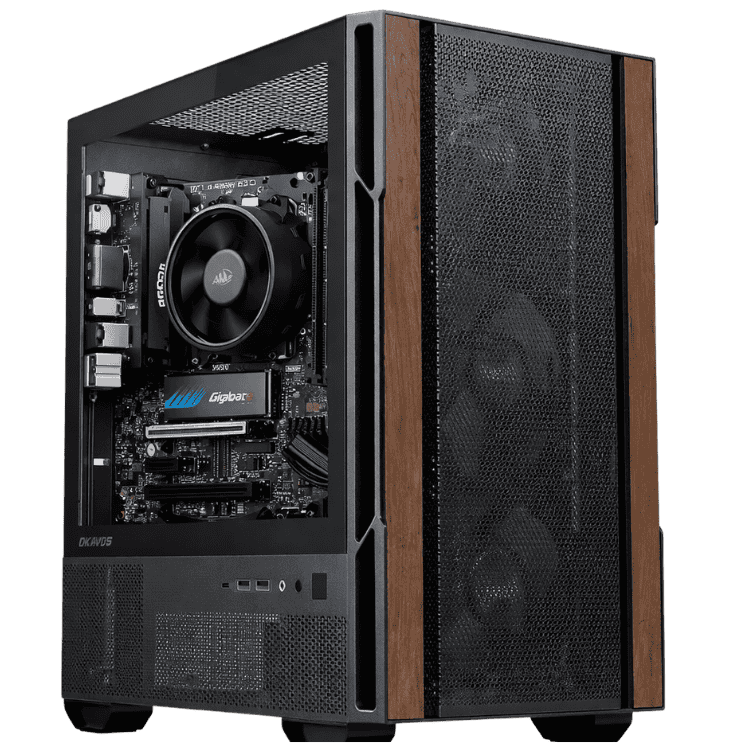
Sole Traders • Invoicing • Light Bookkeeping
CAA Budget Office PC
- Windows 11 installed
- Suitable for light bookkeeping
- Email, browser & documents
- Affordable small-business desktop
A practical low-cost bookkeeping computer for invoicing, email, cloud accounting software, browser work and everyday small-business administration.
View Bookkeeping ComputerBookkeepers • Payroll • BAS • Client Work
Professional Work Computer
- AMD Ryzen 5 5600GT
- 16GB DDR4 memory
- 500GB SSD + Wi-Fi
- Word, Excel, PowerPoint, Outlook & Access included
The recommended bookkeeping computer for users who want Windows 11 and Microsoft Office ready for everyday Xero, MYOB, QuickBooks, Excel and Outlook work.
View Bookkeeping Computer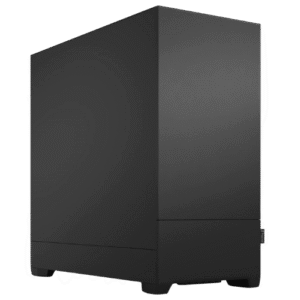
Heavy Multitasking • Many Clients • Multi-Monitor
CAA Creator Work PC
- Windows 11 installed
- More performance for multitasking
- Suitable for heavier Excel workloads
- Stronger platform for professional use
A stronger bookkeeping desktop for users handling more client accounts, larger spreadsheets, heavier multitasking and more demanding multi-monitor workflows.
View Bookkeeping ComputerMicrosoft Office included.
The Professional Work Computer is the strongest general bookkeeping recommendation because Windows 11 and Microsoft Office are already included — including Excel and Outlook.
.svg "Bookkeeping computer Australia 10") WordExcelOutlook
WordExcelOutlook.svg "Bookkeeping computer Australia 13") PowerPoint
PowerPoint.svg "Bookkeeping computer Australia 14") AccessWindows 11
AccessWindows 11Less waiting. More reconciling.
The page is built around the repetitive tasks a real bookkeeper performs — not generic gaming specifications.
Bank Reconciliations
Keep bank feeds, statements, invoices and reconciliation screens open together without fighting a slow computer every time you switch windows.
Invoices & Receipts
Process supplier bills, invoices, receipts, purchase records and expenses with faster file access and smoother switching between documents and accounting software.
Payroll
Run payroll, employee records, reports, email and spreadsheets together without paying for oversized gaming hardware that the workflow does not need.
BAS & GST Work
Keep accounting software, Excel, PDFs and browser-based government or banking services open together during BAS preparation and GST reporting.
Excel & Reporting
Large workbooks, formulas and reporting can expose weak CPUs and low-memory systems. Choose more headroom when spreadsheets are a major part of the day.
Email & Client Documents
Keep Outlook, PDFs, cloud storage, browser tabs and client documents responsive alongside bookkeeping software instead of constantly closing applications.
Keep the source document beside the transaction.
For many bookkeepers, a second monitor can improve the workflow more than spending hundreds extra on unnecessary graphics performance.
Single Monitor
Suitable for light invoicing, simple bookkeeping and sole-trader administration.
Dual Monitors
Recommended for many bookkeepers — accounting software on one screen, statements, invoices, Excel or email on the other.
Triple Monitors
Useful for users handling high client volumes, payroll and multiple source systems at the same time.
One bookkeeper or a whole team.
Match each staff member to their actual workload instead of buying the same oversized computer for everyone.
Independent Bookkeeper
A practical desktop for client work, invoicing, reconciliations, email and general administration.
Small Team
Bookkeeping and payroll staff can use reliable business desktops without unnecessary workstation hardware.
Bookkeeping Office
Ask CAA about multiple systems for bookkeeping, payroll, admin and heavier accounting users.
Different Roles
Use lighter PCs for admin and stronger systems for accountants or users working with larger spreadsheets.
Tell us how your bookkeeping workflow works.
Include the software used, the number of clients or staff, monitor count and whether Microsoft Office is required.
- Xero, MYOB, QuickBooks or other software
- Payroll and BAS requirements
- Excel workload
- Microsoft Office requirements
- One, two or three monitors
- Number of staff / desktops
Need something outside bookkeeping?
Before you buy a bookkeeping PC.
What is the best computer for bookkeeping?
For many professional bookkeepers, a responsive modern processor, SSD storage and around 16GB of memory is a sensible starting point. Heavier multitasking and larger spreadsheets can justify moving higher.
What computer should I use for Xero, MYOB or QuickBooks?
A modern Windows desktop with SSD storage and enough memory for accounting software, browser tabs, email, spreadsheets and PDFs is appropriate for common bookkeeping workflows.
How much RAM should a bookkeeper have?
16GB is a practical target for many professional bookkeeping users. It provides useful headroom for accounting software, browser tabs, email and spreadsheets to stay open together.
Do bookkeepers need a gaming graphics card?
Usually not. Xero, MYOB, QuickBooks, Excel and ordinary office applications generally do not require a high-end dedicated GPU.
Can CAA supply computers for a bookkeeping business?
Yes. Use the quote form and provide the number of users and what each role does so admin, payroll, bookkeeping and accounting staff can be matched to suitable hardware.
Read More: Bookkeeping Computer Australia Buying Guide
Bookkeeping Computer Australia – Choosing a PC for Daily Bookkeeping
A bookkeeping computer australia setup should make repetitive daily work faster. The right bookkeeping computer australia system needs to handle cloud accounting software, browser tabs, email, spreadsheets, invoices, PDFs and payroll tools together without becoming sluggish.
Most buyers do not need an expensive gaming graphics card. A good bookkeeping computer australia desktop should prioritise processor responsiveness, enough memory, SSD storage and support for the monitor setup the bookkeeper uses every day.
Best Computer for Bookkeeping
The best bookkeeping computer australia choice depends on how much work is being done and how many applications stay open at once. A sole trader may only need invoicing, email and a cloud accounting platform, while a professional bookkeeper may have multiple client accounts, Excel, Outlook, PDFs and bank portals open throughout the day.
For many professional users, a bookkeeping computer australia system with 16GB of memory, SSD storage and a responsive modern processor is a sensible starting point. Heavier multitasking and larger spreadsheet workloads can justify moving to a stronger system.
Computer for Xero Bookkeeping
Xero is commonly used by Australian bookkeepers and small businesses. A bookkeeping computer australia system for Xero should not be judged only by whether Xero itself will open. The browser, Outlook, PDFs, Excel and other client tools also need to remain responsive at the same time.
Xero provides information about its Australian accounting platform at Xero Australia. A properly balanced bookkeeping computer australia desktop can make the overall Xero workflow more comfortable, especially when the user keeps many tabs and documents open.
Computer for MYOB Bookkeeping
MYOB users often move between bookkeeping software, email, reports and supporting documents. A bookkeeping computer australia setup should provide enough headroom for that daily multitasking rather than running close to its limits.
MYOB publishes its Australian business software information at MYOB Australia. The right bookkeeping computer australia system should be selected around the complete workflow, not only the minimum requirements of one application.
Computer for QuickBooks Bookkeeping
QuickBooks users have similar requirements. A bookkeeping computer australia desktop should keep accounting software, browser tabs, email, spreadsheets and PDF documents responsive together. QuickBooks provides Australian product information at QuickBooks Australia.
For small-business bookkeeping, the best bookkeeping computer australia system usually spends the budget on CPU responsiveness, memory and SSD storage before unnecessary graphics hardware.
Bookkeeping Computer for Bank Reconciliations
Bank reconciliation is repetitive and often involves multiple sources of information. A bookkeeping computer australia setup can be more productive when the accounting platform is on one screen while statements, invoices or supporting documents remain visible on another.
Users processing high volumes of transactions should choose a bookkeeping computer australia system that stays responsive during long browser sessions and repeated switching between accounting software, documents and email.
Bookkeeping Computer for Invoices and Receipts
Invoices, receipts, supplier bills and expense records are part of everyday bookkeeping. A slow PC adds friction to work that is already repetitive. The right bookkeeping computer australia desktop should open documents quickly and switch between applications without unnecessary waiting.
For users handling accounts payable and accounts receivable, a bookkeeping computer australia system with SSD storage can make everyday file access and application loading feel much more responsive than an ageing hard-drive PC.
Computer for Payroll
Payroll users may have employee records, spreadsheets, reports, accounting software and email open together. A bookkeeping computer australia desktop for payroll should provide reliable multitasking without requiring workstation-class graphics hardware.
Small bookkeeping teams can use the same bookkeeping computer australia approach for payroll staff, then move heavier accounting or reporting users to more powerful systems where needed.
Bookkeeping Computer for BAS and GST Work
Australian bookkeepers often work with BAS preparation, GST records, reporting and reconciliations. A bookkeeping computer australia system should make it easy to keep accounting software, Excel, PDFs and browser-based government or banking services open together.
The goal is not to turn a bookkeeping computer australia desktop into a gaming machine. It is to reduce delays during repetitive business work and give the user enough performance headroom for several years of normal use.
Computer for Excel and Reporting
Excel remains important for many bookkeeping businesses. A bookkeeping computer australia setup used for larger spreadsheets, formulas and reporting benefits from enough memory and a responsive processor. Microsoft provides Excel information through its Microsoft Excel pages.
The Professional Work Computer is the main bookkeeping computer australia recommendation on this page because Microsoft Office is included. Users with heavier Excel workloads or more aggressive multitasking can move to the stronger Creator Work PC.
Dual Monitor Bookkeeping Computer
A dual-monitor bookkeeping computer australia setup can improve the daily workflow by keeping the accounting platform visible on one display while source documents, Outlook or Excel remain visible on the other.
For many bookkeepers, improving the display setup can be more useful than paying for unnecessary GPU performance. Buyers who need three monitors should confirm the chosen bookkeeping computer australia system has the required display outputs before purchase.
How Much RAM Does a Bookkeeper Need?
For many professional users, 16GB of memory is a sensible target for a modern bookkeeping computer australia desktop. It gives the system more room for Xero, MYOB, QuickBooks, Outlook, Excel, PDFs and browser tabs to remain open together.
Heavier users with many clients, larger spreadsheets or more aggressive multitasking may benefit from additional memory, but not every bookkeeping computer australia buyer needs to over-specify the system.
Do Bookkeepers Need a Graphics Card?
Most users buying a bookkeeping computer australia desktop do not need a dedicated gaming graphics card. Xero, MYOB, QuickBooks, Excel and ordinary office applications are not primarily GPU-driven workloads.
A dedicated GPU becomes more relevant when the same bookkeeping computer australia system also handles CAD, video editing, 3D work or other specialist applications. Those buyers can compare Work Computers Australia.
Bookkeeping Computer with Microsoft Office Included
The Professional Work Computer is a strong bookkeeping computer australia option because Microsoft Office is included. That gives the user Word, Excel, PowerPoint, Outlook and Access alongside Windows 11.
Microsoft publishes broader business productivity information on its Microsoft 365 for business pages. Businesses choosing a bookkeeping computer australia system should still confirm which cloud subscriptions and software licences they already use.
Bookkeeping Computers for a Small Business
CAA can supply one bookkeeping computer australia desktop for an independent bookkeeper or help a bookkeeping business compare systems for several staff. Not every employee needs identical hardware, so systems can be matched to actual workloads.
For heavier accounting and financial reporting, compare the dedicated Accounting Computer Australia page. For general administration and office use, compare Business Computer Australia.
A carefully matched bookkeeping computer australia system should support daily bookkeeping without unnecessary hardware cost.
Spend your time reconciling accounts — not waiting for your computer.
Choose a bookkeeping PC around Xero, MYOB, QuickBooks, payroll, BAS, invoices and the monitor setup your staff actually use.